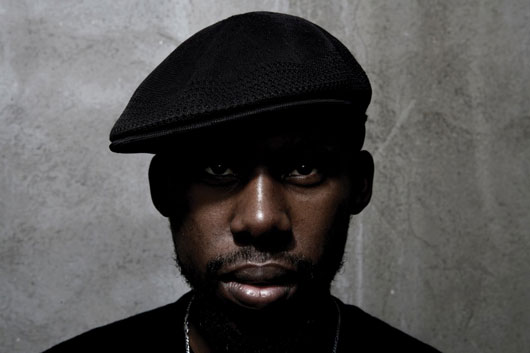
Flying Lotus, don of the LA beat scene and father of the Brainfeeder label, will soon take select members of his musical family on the road for a few dates on the East and West Coasts. Travelling along with producer Steven Ellison later this month will be the man who’s responsible for all of those jazzy, breakneck basslines on Cosmogramma, Thundercat, as well as Teebs, Austin Peralta, and Strangeloop, with Taylor McFerrin performing at the two New York dates. You can check out the full schedule of performances below.
06.20 New York, NY – Bowery Ballroom*^ 06.22 Brooklyn, NY – Music Hall Of Williamsburg*^ 06.23 Los Angeles, CA – The Music Box At The Henry Fonda Theater* 06.24 San Francisco, CA – 103 Harriet*
*all dates with Flying Lotus, Thundercat, Austin Peralta, Teebs, Strangeloop ^ Special Guest Taylor McFerrin
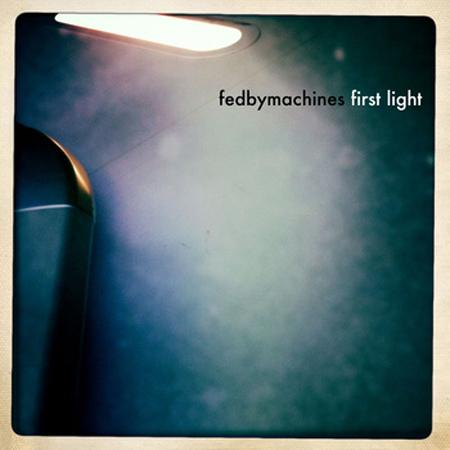
Last month we shared German techno producer Essáy‘s excellent “Love & Air” from his Distance & Lights EP on Cut, a net label with DFRNT at the helm. Apparently, Essáy is a pretty busy guy these days, as the man recently tipped us to his own net label, simply titled Warminal. Releasing his own dub-techno tunes as well as tracks by kindred spirits, Warminal highlights the kind of dubby electronic sound we’ve come to associate with Essáy. Enter Dutch producer Fedbymachines, who likes to “explore the moving boundaries between music and just random sound.” Giving body to that statement, he’s offered up “First Light,” a garage-leaning exercise in deep atmospherics that features the kind of crisp percussion and ghostly vocals generally associated with mid-’00s Hyperdub. (Yes, it sounds like Burial.) Give it a download below and be sure to buy the full single on Warminal’s Bandcamp.
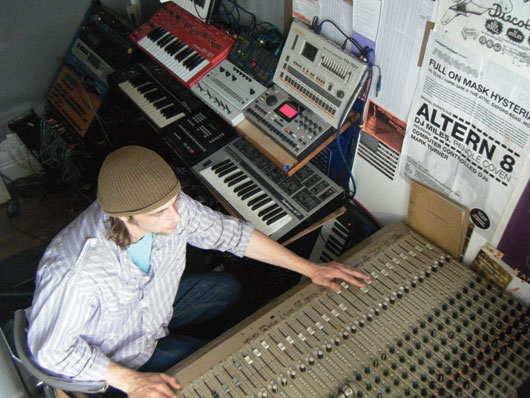
One half of Manchester dark-dub duo Demdike Stare (the esoteric vinyl obsessives responsible for this spooky podcast), Miles Whittaker (a.k.a. Mille a.k.a. MLZ) just announced that he will drop a brand-new EP produced under his given name, a four-song offering called Facets. The record is scheduled to hit retailers on on July 18 via the producer’s longtime label Modern Love, and is said to hold the same kind of dubby techno sound that Whittaker has spent his musical career refining. Before the limited-edition 12″ drops, you can check out its artwork and tracklist below. (via FACT)
Minneapolis-based producer Huntley Miller (a.k.a. Cepia) just dropped this one in our inbox, saying not a whole lot more than “Hello” and “Thanks!” Miller’s refreshing brevity—not to mention his solid musical background and time spent as a Ghostly-signed artist—lead to a couple of quick mouse clicks, and before we knew it, we were nodding our heads to the angular, steel-drum grooves of “Algiers.” It brings to mind a handful of Warp’s finest artists, particularly the clattering piano melodies from Aphex Twin’s Drukqs and the drifty polyrhythms of early Autechre, but manages to distill those sounds into something fresh and original. It’s anyone’s guess whether this track is a one-off freebie or part of something larger; we’re just glad Cepia shared it with us.
“Go Go Wine,” Vybz Kartel‘s ode to stripper gymnastics, has been out for a little over a month now. Riding a red-hot riddim constructed by the inimitable Dre Skull (check out a recent interview he did with Strictly the Best), we just can’t get enough of it, which is why were stoked on the release of the official video. Shot on location in and around a Jamaican strip club (mostly inside), the video captures the sleazy vibe of the music through a perspective that affords shots at times reminiscent of one of the finest examples of cinema ever. Peep the full video above and check out Vybz Kartel’s soon-to-be released LP, Kingston Story, out June 21 on Mixpak.
It’s doubtful that when Mark Pritchard and Steve Spacek named their new collaboration Africa Hitech, their production techniques were in some way trying to approximate African technology. Case in point: One of the commonly used pieces of gear on their new record, 93 Million Miles, is actually an iPhone program called iSyn. So we had Spacek tell us a bit about the process, and which other iPhone-compatible software is out there:
Make sure you have either a good pair of headphones, or a mini-jack-to-phono-lead so you can connect to a decent soundsystem or studio set-up. A lot of these music apps may initially come across as toys. But be warned, a handful of the really good ones can kick out some serious sound, and can easily cover all those fat frequencies so prevalent in modern production. In particular, with iSyn, be wary of your listening level, especially when using headphones, as you will find that the bass along with some of the other frequencies can really kick out and damage those precious ears!
You can grab the apps via iTunes, or directly via your iPhone/iPod. If you can, try it before you buy it. Some apps come as a paired-down version—usually when they are launched—for free or at a greatly reduced price. I go for a certain look. It sounds shallow, but if I don’t like the look of a piece of gear, then I find it less inspirational to use—the exception being iSyn. I never liked the look of this amazing piece of tech in the beginning. Suffice to say, the looks have grown on me and it is now officially my first stop when I feel inspired to knock up a little something for the floor! Other great apps to check are Nano Studio, BeatMaker2, Akai SynthStation, and FunkBox, which is an emulation of seven of the greatest drum machines from the past: 808, 909, 606, CR-78, mainly Roland. Plus, you can export your beats across to your main computer, along with the MIDI files too.
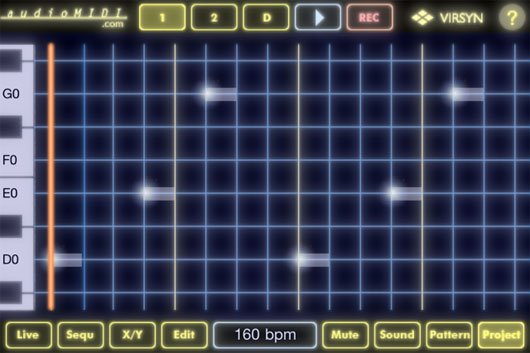
Now, begin to build your beat. As soon as you launch iSyn, you will be presented with a two-octave keyboard set in a monochrome-style screen graphic. The colors consist of mainly yellow on a black background with blue, red, or green taking over, depending on the track or channel you are in.
The app consists of three tracks for you to work within:
Initially, I thought three tracks could be limiting, but, as is usually the way when dealing with the creative interface on a piece of musical equipment, the limitations are where the real juices can start to flow. iSyn has this vibe in abundance!
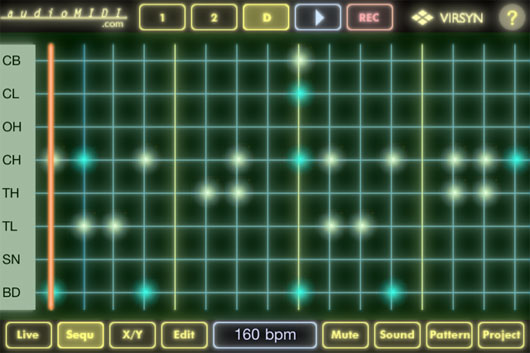
You can start with any of the three tracks, but I think the drum track is usually a good place to begin. At the top of the screen you will see the aforementioned tracks represented as three small rectangular buttons, near which you will find a play button in white and the record bottom in red, of course. Hit the button marked ‘D.’ There you will find eight green circular drum pads. Now hit the button marked ‘Sequ’ at the bottom left of the screen next to the live button, and you will be presented with a grid (step editor) in green-on-black graphics. On the left side of the grid are the initials of eight drum sounds for you to sequence your beat with:
iSyn has eight kits to choose from, and you will find them all in the button marked ‘Sound,’ which is at the bottom right of the screen between the ‘Mute’ and ‘Pattern’ buttons. To start making a beat, touch anywhere on the grid where the horizontal and vertical lines meet. You will see those points light up as white dots. Now, press the white play button at the top of the screen and you will be able to hear the results as the orange playhead line travels from left to right across the grid/timeline. By now you should have a beat.
If you want to add accents to certain parts of your beat, touch and hold down the parts (that are already activated) for longer than usual, and you will notice the activated dots turn from white to green. You may notice your beat jumping out at you a little bit more, and the feel and swing might have more of a vibe, too—all subjective stuff, of course, but hopefully you will start to hear a vibe that may be to your liking.
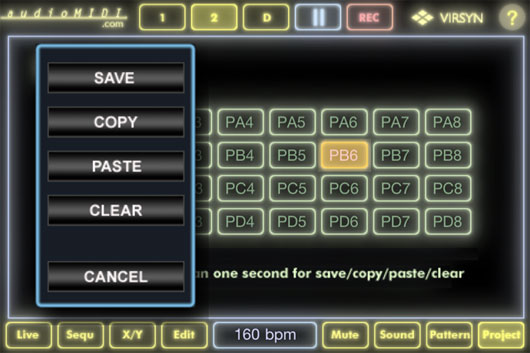
Once you are happy with your beat, I would advise that you save it straight away. The buttons on these devices are small and can be quite fiddly, unless you are working on an iPad. If, say, you touch the wrong button—like a different song in the project section (lower right of the screen)—then if try to go back to your new beat or song, all that is not saved will be lost. To save your new beat, press the project button. You will see 32 little buttons in a grid. Press and hold one of those buttons and you will be presented with a simple drop down menu:
Hold the save button until it flashes. Your beat is now saved as a song in project mode. There is no way of naming your project/songs within iSyn, but after a while you will start to remember which ideas correspond to a certain number.
Now that the first part of your song (the beat) is saved, you can move to Syn1 or 2 to begin adding a bassline or a melody part. As with the drum section, you will be presented with a step sequencer grid. Only this time, in place of the vertical drum initials on the left of the screen, you will find the keys of a piano instead. Said keys will have the appropriate musical notes displayed on them. This makes it easier to keep track of your notes, seeing as the vertical keyboard can be moved up or down so that you have access to quite a few octaves.
Both Syn1 and 2 are monophonic, which is fine for bass but can be limiting if you have ideas that consist of chords. This is where the creative juices can come into play, as was the case of the track “93 Million Miles.” I had these chord ideas running through my head as soon as I had finished the drums and bass. But obviously there was no way I would be able to add the chord ideas at this stage in the process, due to the limitations mentioned above. So, instead, I planned to add them later on, once I had transferred the idea into Logic. Regardless, I wanted to put something in that would fill the space there and then.
The way I interpreted the chordal ideas featured in “93 Million Miles” into the sequence using the monophonic synth was by breaking down the chords into their basic note structure and converting them into a scale or arpeggio. Ask me which particular scale and I wouldn’t be able to tell you, but I can usually hear all the notes present within a chord. Now you can have a ton of fun adding rhythmical characteristics to your original chord idea via the note grid or step sequencer. Arpeggiators are a really great way of injecting the groove of your rhythm section into the musical parts of a track. The possibilities are endless!
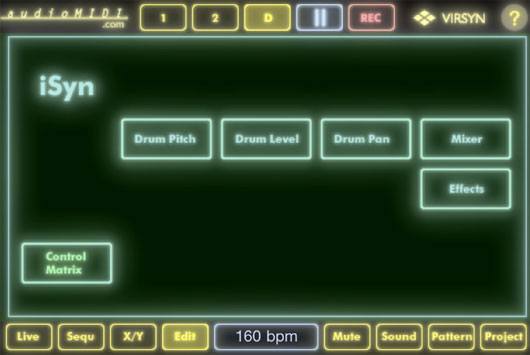
Once you have your three main elements cooking—drum, bass, melody (arpeggio)—then the real fun can begin! Being the iPhone/iPod, you have access to functions within iSyn that utilize the accelerometer and three-axis gyro capabilities of the device. To give you an example: press the D button at the top of the screen that is the drum section. Now, that you are in Drum mode, go down to the bottom of the screen and press the Edit button. This is next to a little white button/window displaying the current bpm. Once you are in the edit section, things can start to look a bit confusing, but believe me when I say that with familiarity it will all become a breeze to use. Once in edit mode, you will be presented with six slightly larger rectangular buttons:
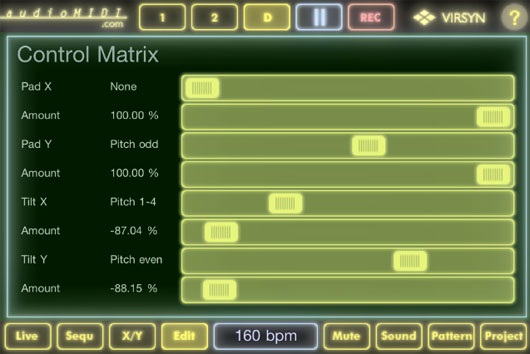
Now, press Control Matrix at the bottom left corner of the screen. You will be presented with eight horizontal sliders with their appropriate descriptions to the left of the screen. These descriptions consist of two columns: the left gives you a combination of the parameter to be tweaked and the right gives you the amount, value, or nature of your tweaks. Go down until you see the slider, which is second from the bottom of the screen. To the far left of that slider it should say Tilt Y. Move the slider along until you see Pitch Even in the right (value) column, and let the fun and games begin!
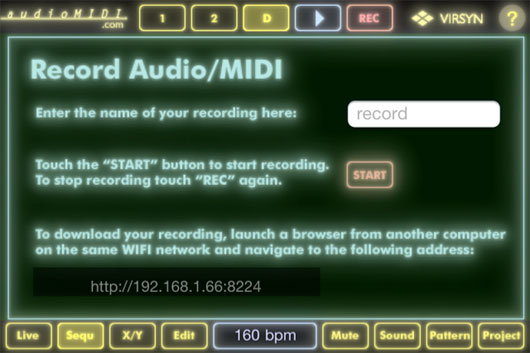
If your sequence isn’t already playing, press the play button and start to move your phone/pod around in a random three-dimensional trajectory. You will notice that certain aspects of your drum track will start to change in pitch. Also, you will notice certain aspects of your two synth sounds will start to warp, resonate, filter, or even mute depending on the position of your device. This opens up a whole new world of live-track performance mixing. Plus, if you go to the Record section (the only spot where you can name your work), you can do a live rendering of your sequence/song and all the movements you make while you are in record mode. The results can be very impressive and you will soon come to realize that if you were to try to obtain these same results—say, using your usual tools for production and beat making—it would take you a very long time. Plus you would miss out on the whole live fluid vibe that iSyn can generate in spades.
Once you have finished your recording, at the bottom of the record page you will find a URL or web address. Make sure you have another computer near by on the same WiFi network. Launch your browser on this computer and go to the URL. There you will find your recording along with a list of any others you might have done before, plus MIDI files to go with them. You can now save these files as Quicktimes your computer. Enjoy!
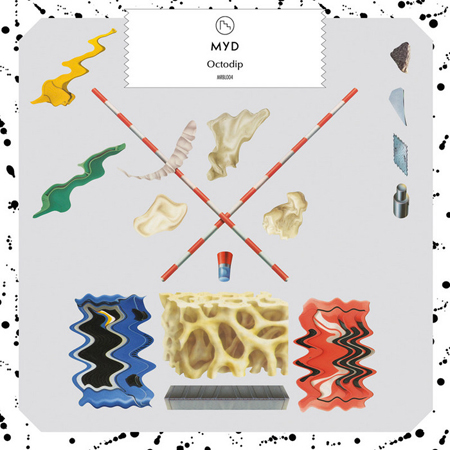
As a young co-founder of the Club Cheval crew, French DJ/producer Myd hasn’t released that much material, but what he has released, we’ve liked. Last year, we shared with you his “Train to Bamako”, a playful romp through an imagined African soundscape. Now he’s back with the titular track from Octodip, his new EP on Marble. Sharing similarly playful atmospherics as his previous work, “Octodip” takes the rhythm of funky and melds it with a distinctly Gallic club sensibility, complete with pulsing compression, a “funky worm” synth line, and chopped-up vocals that wouldn’t sound out of place coming from an ambulance. The Octodip EP is out now.
What is it with the standard bearers of minimal techno these days? If it’s not Isolee noodling around on his bass, or Wighnomy Brother Robag Wruhme going ambient, it’s Ada (a.k.a. Cologne-based producer Michaela Dippel) testing out jazzier waters with finger-picked Spanish guitar. Whatever the case, it’s clear that nearly a decade after the great minimal hype, the style required a bit of a makeover… and we’re probably just in its foundation stage right now. That said, while it’s not an impeccable album, Ada’s Meine Zarten Pfoten (German for “my tender paws”) does offer some pretty exciting experimentation and a few really great pop songs.
“Faith,” the album’s opener (which also happens to be a Luscious Jackson cover), arrives on a bed of static before Dippel’s treated coos morph into a guitar-plucked minor-key melody, all of these elements laying the groundwork for a real, full-on, verse-chorus-verse vocal song. DJ tracks these are not. In fact, it’s hard to say if any of them would be suited to a dancefloor at all—a complete departure from Dippel’s dreamy, but entirely floor-ready, 2004 debut, Blondie. Instead, she riffs on Louis Armstrong’s “A Kiss to Build a Dream on” on the track “Likely,” with soft Spanish guitar, shakers, summery vocals, and nary a drum sound, and then goes in a peculiar but awesome new direction with “The Jazz Singer (Re-Imagined by Ada)”—the disc’s standout track—a quick-moving electronic pop song driven by Ada’s tiny, polyrhythmic vocal acrobatics, and some twinkling organ and piano chords.
The record’s title more than hints at the fact that each of its songs is imbued with a Saint Etienne-like lightheartedness, even when they do approach the dancefloor nearer to the album’s end. Case in point: “Happy Birthday,” a slower-tempo 4/4 tune, remains 100% joyful and peaceful, but reminds us that Dippel is never going to fully abandon the dancefloor that birthed her.
Fans of Sheffield-based DJ/producer Toddla T will be happy to know that the eclectic and prolific artist has announced the imminent release of Watch Me Dance on Ninja Tune, his second album. Though he’s known for his manic DJ sets—check out the podcast he did for us last year—this album is said to focus on material that isn’t necessarily geared towards peak-time club play, but instead more relaxed environments. In addition, the album will feature a star-studded cast of guest artists like Roots Manuva, Skream, and Miss Dynamite. Watch Me Dance doesn’t come out til August 22 but you can check below for the tracklisting, album art, and a video for the lead single “Take It Back.” (via Resident Advisor)
Tracklist 01. Watch Me Dance (with Roots Manuva) 02. Take It Back 03. Cruise Control 04. Cherry Picking 05. Streets So Warm 06. Badman Flu 07. Body Good 08. How Beautiful It Would Be 09. Lovely Girl 10. Do It Your Way 11. Fly
Really, it was only a matter of time before these two dark-pop outfits came together on a track. Taking sparse elements of an unreleased cut from 2009 by Brooklyn duo Light Asylum (pictured above), fellow goth fiends Salem create an ominous remix of “Shallow Tears” that sounds much more like a cover than anything else. The Midwestern band uses its own deep synth sounds, skittering drum-machine beats, and warbling, distorting effects to give the already sullen ballad a blown-out, far-gone tone. And though we miss the soulful, commanding baritone of Shannon Funchess, the treatments Salem uses on her voice really drive home the otherworldly vibes. (via Altered Zones)